EoIP
Ethernet over IP (EoIP) Tunneling is a MikroTik RouterOS protocol designed to create an Ethernet tunnel between two routers over an IP network. It is based on GRE encapsulation (RFC 1701) and allows Ethernet frames to be transported across routed IP infrastructure, effectively extending a Layer 2 network between remote sites.
The EoIP tunnel interface appears as a virtual Ethernet interface in RouterOS and can be used in conjunction with the bridging functionality. When added to a bridge, all Ethernet traffic, including broadcasts and non-IP protocols, is forwarded across the tunnel as if the endpoints were directly connected by a physical Ethernet link.
EoIP tunnels can operate over IPIP, PPTP, or any other IP-based transport that supports GRE encapsulation. This provides flexibility in building various network topologies.
Typical use cases for EoIP include bridging LAN segments over the internet, extending LANs across encrypted tunnels (when combined with IPsec or other secure transport), and connecting networks over wireless point-to-point or ad-hoc links.
EoIP encapsulates Ethernet frames inside GRE (IP protocol 47) packets and forwards them to the remote tunnel endpoint. The receiving router decapsulates the packets and injects the original Ethernet frames into the local bridge domain.
Sub-menu: /interface/eoip
Property Description
| Property | Description |
|---|---|
| allow-fast-path (yes | no; Default: yes) | Whether to allow FastPath processing. Must be disabled if IPsec tunneling is used. |
| **arp (**disabled | enabled | proxy-arp | reply-only; Default: enabled) | Address Resolution Protocol mode.
|
| arp-timeout (integer[/time]; Default: auto) | Time interval in which ARP entries should time out. |
| clamp-tcp-mss (yes | no; Default: yes) | Controls whether to change MSS size for received TCP SYN packets. When enabled, a router will change the MSS size for received TCP SYN packets if the current MSS size exceeds the tunnel interface MTU (taking into account the TCP/IP overhead).The received encapsulated packet will still contain the original MSS, and only after decapsulation the MSS is changed. |
| comment (string; Default: ) | Short description of the interface. |
| disabled (yes | no; Default: no) | Whether an item is disabled. |
| dont-fragment (inherit | no; Default: no) | Whether to include DF bit in related packets: no - fragment if needed, inherit - use Don't Fragment flag of original packet. (Without Don't Fragment: inherit - packet may be fragmented). |
| dscp (integer: 0-63; Default: inherited) | DSCP value of packet. Inherited option means that dscp value will be inherited from packet which is going to be encapsulated. |
| ipsec-secret (string; Default: ) sensitive | When secret is specified, router adds dynamic IPsec peer to remote-address with pre-shared key and policy (by default phase2 uses sha1/aes128cbc). |
| keepalive (integer[/time],integer 0..4294967295; Default: 10s,10) | Tunnel keepalive parameter sets the time interval in which the tunnel running flag will remain even if the remote end of tunnel goes down. If configured time,retries fail, interface running flag is removed. Parameters are written in following format: KeepaliveInterval,KeepaliveRetries where KeepaliveInterval is time interval and KeepaliveRetries - number of retry attempts. By default keepalive is set to 10 seconds and 10 retries. |
| l2mtu (integer; read-only) | Layer2 Maximum transmission unit. Not configurable for EoIP. MTU in RouterOS |
| local-address (IP; Default: ) | Source address of the tunnel packets, local on the router. |
| loop-protect | |
| loop-protect-disable-time | |
| loop-protect-send-interval | |
| mac-address (MAC; Default: ) | Media Access Control number of an interface. The address numeration authority IANA allows the use of MAC addresses in the range from 00:00:5E:80:00:00 - 00:00:5E:FF:FF:FF freely |
| mtu (integer; Default: auto) | Layer3 Maximum transmission unit |
| name (string; Default: ) | Interface name |
| remote-address (IP; Default: ) | IP address of remote end of EoIP tunnel |
| tunnel-id (integer: 65536; Default: ) | Unique tunnel identifier, which must match other side of the tunnel |
Configuration Examples
The parameter tunnel-id is a method of identifying a tunnel. It must be unique for each EoIP tunnel.
EoIP tunnel adds at least 42-byte overhead (8-byte GRE + 14-byte Ethernet + 20-byte IP). MTU should be set to 1500 to eliminate packet fragmentation inside the tunnel (that allows transparent bridging of Ethernet-like networks so that it would be possible to transport full-sized Ethernet frames over the tunnel).
When bridging EoIP tunnels, it is highly recommended to set unique MAC addresses for each tunnel for the bridge algorithms to work correctly. For EoIP interfaces you can use MAC addresses that are in the range from 00:00:5E:80:00:00 - 00:00:5E:FF:FF:FF, which IANA has reserved for such cases. Alternatively, you can set the second bit of the first byte to modify the auto-assigned address into a 'locally administered address', assigned by the network administrator, and thus use any MAC address. You just need to ensure they are unique between the hosts connected to one bridge.
Example
Let us assume we want to bridge two networks: 'Station' and 'AP'. By using EoIP, a setup can be made so that Station and AP LANs are in the same Layer2 broadcast domain.
Consider the following setup:
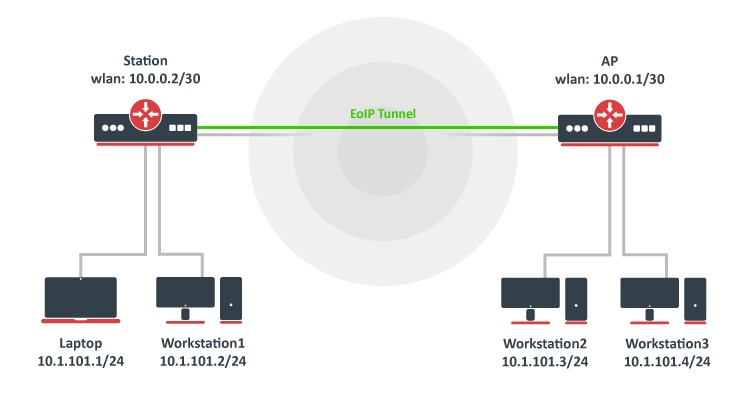
As you know, wireless stations cannot be bridged; to overcome this limitation (not involving WDS), we will create an EoIP tunnel over the wireless link and bridge it with interfaces connected to local networks.
We will not cover wireless configuration in this example, let's assume that the wireless link is already established.
At first, we create an EoIP tunnel on our AP:
/interface/eoip/add name="eoip-remote" tunnel-id=0 remote-address=10.0.0.2 disabled=no
Verify the interface is created:
[admin@AP] > /interface/eoip/print
Flags: X - disabled; R - running
 0  R name="eoip-remote" mtu=auto actual-mtu=1458 l2mtu=65535 mac-address=FE:A5:6C:3F:26:C5 arp=enabled
      arp-timeout=auto loop-protect=default loop-protect-status=off loop-protect-send-interval=5s
      loop-protect-disable-time=5m local-address=0.0.0.0 remote-address=10.0.0.2 tunnel-id=0
      keepalive=10s,10 dscp=inherit clamp-tcp-mss=yes dont-fragment=no allow-fast-path=yes
Station router:
/interface/eoip/add name="eoip-main" tunnel-id=0 remote-address=10.0.0.1 disabled=no
Verify the interface is created:
[admin@Station] >  /interface/eoip/print
Flags: X - disabled; R - running
 0  R name="eoip-main" mtu=auto actual-mtu=1458 l2mtu=65535 mac-address=FE:4B:71:05:EA:8B arp=enabled
      arp-timeout=auto loop-protect=default loop-protect-status=off loop-protect-send-interval=5s
      loop-protect-disable-time=5m local-address=0.0.0.0 remote-address=10.0.0.1 tunnel-id=0
      keepalive=10s,10 dscp=inherit clamp-tcp-mss=yes dont-fragment=no allow-fast-path=yes
Next, we will bridge local interfaces with an EoIP tunnel on our AP. If you already have a local bridge interface, simply add the EoIP interface to it:
/interface/bridge/port/add bridge=bridge1 interface=eoip-remote
The bridge port list should list all local LAN interfaces and the EoIP interface:
[admin@AP] > /interface/bridge/port/print
Flags: I - INACTIVE; H - HW-OFFLOAD
Columns: INTERFACE, BRIDGE, HW, PVID, PRIORITY, PATH-COST, INTERNAL-PATH-COST, HORIZON
#    INTERFACE       BRIDGE   HW   PVID  PRIORITY  PATH-COST  INTERNAL-PATH-COST  HORIZON
0  H ether2          bridge1  yes     1  0x80             10                  10  none
1  H ether3          bridge1  yes     1  0x80             10                  10  none
2    eoip-remote     bridge1  yes     1  0x80             10                  10  none
On the Station router, if you do not have a local bridge interface, create a new bridge and add both EoIP and local LAN interfaces to it:
/interface/bridge/add name=bridge1
/interface/bridge/port/add bridge=bridge1 interface=ether2
/interface/bridge/port/add bridge=bridge1 interface=eoip-main
Verify the bridge port section:
[admin@Station] > /interface/bridge/port/print
Flags: I - INACTIVE; H - HW-OFFLOAD
Columns: INTERFACE, BRIDGE, HW, PVID, PRIORITY, PATH-COST, INTERNAL-PATH-COST, HORIZON
#    INTERFACE     BRIDGE   HW   PVID  PRIORITY  PATH-COST  INTERNAL-PATH-COST  HORIZON
0  H ether2        bridge1  yes     1  0x80             10                  10  none
2    eoip-main     bridge1  yes     1  0x80             10                  10  none
Now both sites are in the same Layer2 broadcast domain. You can set up IP addresses from the same network on both sites.